The same 12 problems keep appearing in apps built with Lovable, Bolt, Replit and Cursor. Five are about data and access: open database rules, exposed keys and checks that exist only in the interface. The rest are about money, code, operations and product: unverified payments, no tests, no staging, no restorable backups and unfinished user flows.
[ Key takeaways ]
AI builders optimise for what you can see in a demo; most of these issues are invisible until a second user, a failed payment or a bad deploy.
Start with data access: test your app as a second user trying to read the first user’s records.
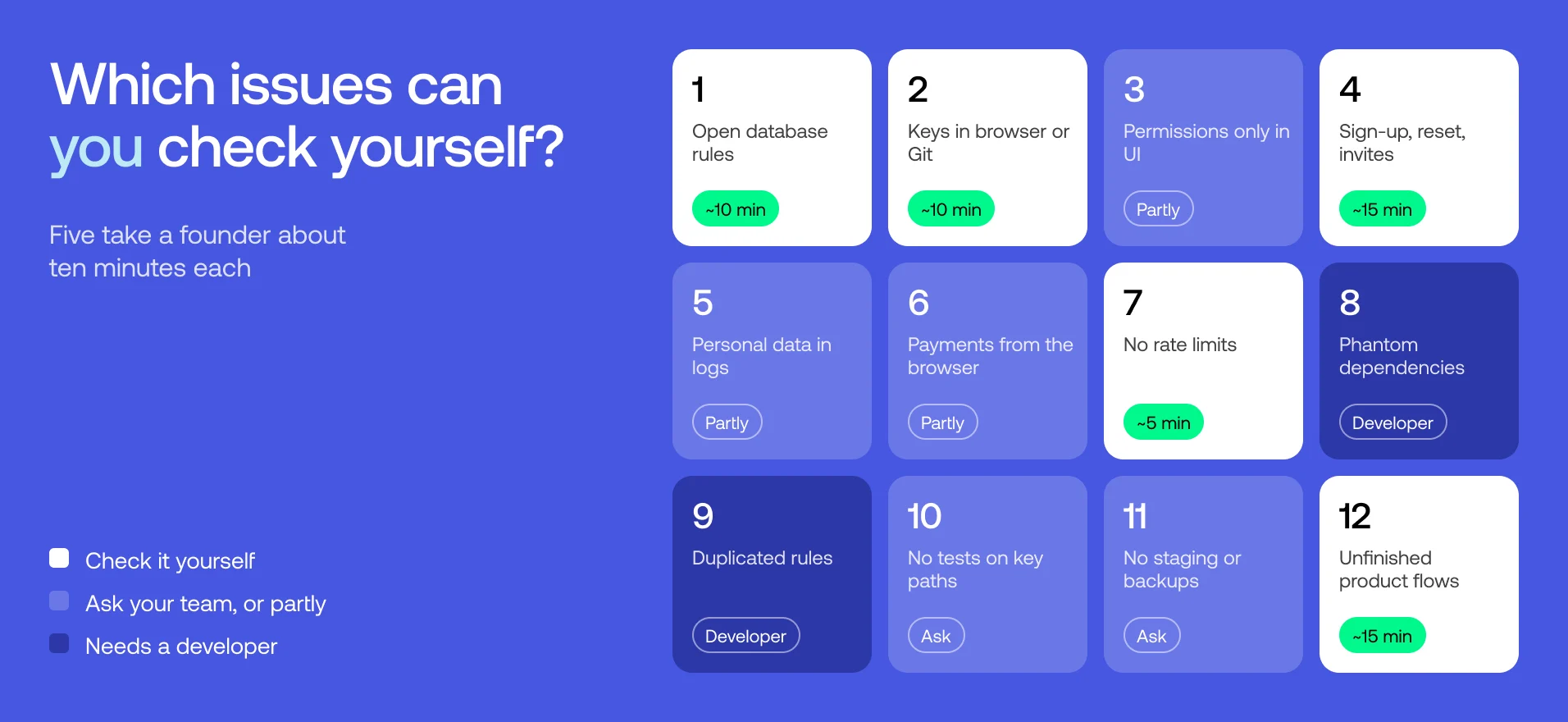
Five of the twelve issues can be checked by a non-technical founder in about ten minutes each.
Built-in scanners catch some of these; business-logic, payment and recovery problems need a human review.
Most issues are fixable in place; few require a rebuild.
Have a project in mind? Talk to Ruben, our Chief Sales Officer.
From open database rules to untested backups: the 12 problems that keep appearing in AI-built apps, why AI tools create them and how to check your own app.
Vibe coding gets you from idea to working product faster than anything before it. But “working” in a demo and “working” with real users, money and data are different tests. Below are the 12 issues that come up again and again when apps built with AI tools are reviewed, grouped by where they live, with a quick way to check each one yourself.
The list draws on public research from 2025–2026 — security scans of more than 130,000 apps built with Lovable, Bolt, Replit and similar tools, studies of AI-generated code and well-documented incidents. Most large scans come from security vendors and count things differently, so treat the numbers as a sense of scale, not exact rates.
1 — Issue: Database rules that let anyone read or write; Area: Data & access; Can a founder check it?: Yes, ~10 min; Typical fix: Per-table policies + test
2 — Issue: Secret keys in the browser or Git history; Area: Data & access; Can a founder check it?: Yes, ~10 min; Typical fix: Rotate, move to server
3 — Issue: Permissions only in the interface; Area: Data & access; Can a founder check it?: Partly; Typical fix: Server-side checks
4 — Issue: Sign-up, reset and invites that break off the happy path; Area: Data & access; Can a founder check it?: Yes, ~15 min; Typical fix: Fix lifecycle flows
5 — Issue: Personal data leaking into logs and analytics; Area: Data & access; Can a founder check it?: Partly; Typical fix: Redact, shorten retention
6 — Issue: Payments trusted from the browser; Area: Money & abuse; Can a founder check it?: Partly; Typical fix: Verify on server
7 — Issue: No limits on AI, email or sign-up endpoints; Area: Money & abuse; Can a founder check it?: Yes, ~5 min; Typical fix: Rate limits, spend caps
8 — Issue: Phantom and unnecessary dependencies; Area: Code; Can a founder check it?: No; Typical fix: Remove, verify, pin
9 — Issue: The same rule copied into many places; Area: Code; Can a founder check it?: No; Typical fix: Consolidate
10 — Issue: No tests on the paths that matter; Area: Code; Can a founder check it?: Yes, ask; Typical fix: Tests on critical flows
11 — Issue: One environment, no rollback, no restorable backup; Area: Operations; Can a founder check it?: Yes, ask; Typical fix: Staging, backups, runbook
12 — Issue: Unfinished product flows: empty states, errors, analytics; Area: Product; Can a founder check it?: Yes, ~15 min; Typical fix: Design and instrument
Data and access
1. Database rules that let anyone read or write
What it looks like: row-level security (RLS) is switched off on some tables, or switched on with a policy that allows everyone. Storage buckets are public. The app works perfectly — for every visitor, including ones who are not logged in.
Why AI tools create it: during prototyping, the fastest way to make a screen show data is to open access. The generated interface hides the problem because it only asks for the right records.
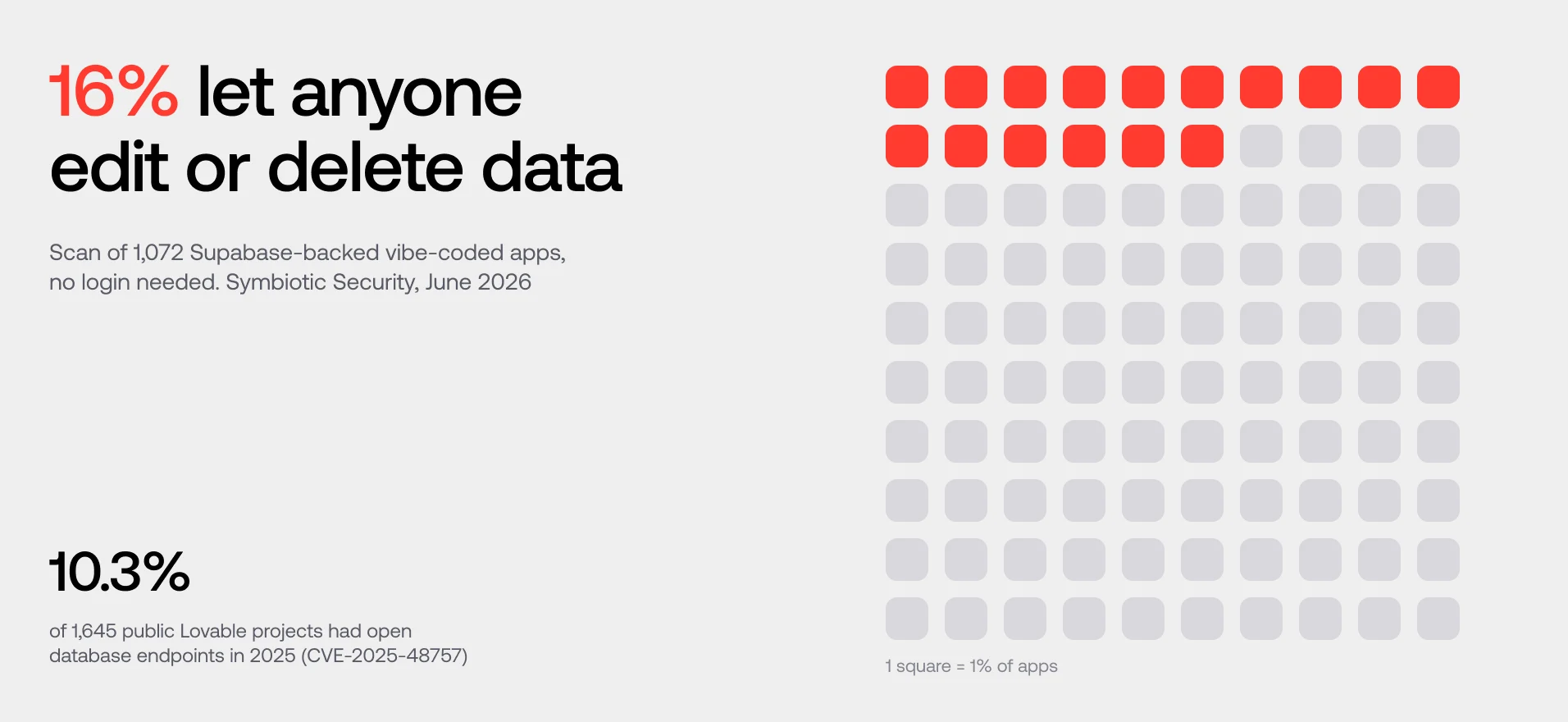
Public evidence: a 2025 scan of 1,645 public Lovable projects found 170 (about 10.3%) with database endpoints that unauthenticated visitors could read or write (CVE-2025-48757). In a June 2026 scan of 1,072 Supabase-backed vibe-coded apps, 16% let anyone modify or delete data without logging in. In February 2026, Moltbook — a site its founder said he built without writing a line of code — exposed its whole database the same way: a Supabase key in the browser and RLS switched off gave read and write access to about 30,000 email addresses and 1.5 million API tokens.
10-minute check: in your Supabase (or Firebase) dashboard, list every table and bucket and confirm access rules are enabled and specific. Then log in as a second test user and try to open a URL or record ID that belongs to the first one.
Fix: write a policy per table and per action (read, insert, update, delete), tie it to the signed-in user or organisation, and keep a test that proves user B cannot reach user A’s data.
2. Secret keys in the browser or Git history
What it looks like: an API key for OpenAI, Stripe or the database admin role sits in client-side code, in a committed .env file or in an old commit.
Why AI tools create it: “make it work” prompts often paste keys where the code runs — and in a front-end app, that is the user’s browser. Deleting the line later does not remove it from Git history.
Public evidence: Red Hunt Labs scanned about 130,000 sites built on 13 vibe-coding platforms in September 2025: one in five exposed at least one secret in its public code, and OpenAI keys were 12% of what leaked. Escape found 400+ exposed secrets in 5,600 vibe-coded apps, including Supabase service-role keys. Supabase’s documentation is explicit: publishable (anon) keys are meant to be public and rely on RLS; secret (service-role) keys bypass RLS and must never leave your server.
10-minute check: open your live app, press F12, search the loaded scripts for sk_, sb_secret, service_role and your providers’ key prefixes. Search your repository history for the same strings.
Fix: revoke and rotate any exposed key first, then move privileged calls into server or edge functions, and turn on secret scanning in your repository.
3. Permissions that exist only in the interface
What it looks like: the “Delete user” button is hidden for non-admins, but the API endpoint behind it accepts any signed-in user. Records are fetched by an ID from the URL without checking who owns them.
Why AI tools create it: a prompt like “only admins can see the admin page” is satisfied visually. The model hides the page; it does not necessarily protect the action.
Public evidence: OWASP ranks broken access control as the number one risk in its Top 10:2025. In CodeRabbit’s review of 470 pull requests (December 2025), AI-assisted code was 1.91 times more likely to contain insecure object references — the “change the ID in the URL and see someone else’s data” bug. Platforms get this wrong too: in July 2025, Wiz found that a public app ID was enough to register in someone else’s private Base44 app and bypass its single sign-on; it was fixed within a day. Our AI code security article covers how to test it in depth.
Check: ask your developer (or your AI tool) to list every action that changes data and show where the server checks permission for each. If the answer is “in the component”, it is not checked.
Fix: enforce permissions on the server for every protected action, deny by default and add one negative test per role.
4. Sign-up, reset and invites that break off the happy path
What it looks like: sign-in works, but password reset links never expire, invited users land in the wrong organisation, deleted users can still use an open session, and email changes do not require confirmation.
Why AI tools create it: demos test the first login. Account lifecycle — reset, invite, role change, deletion — is rarely prompted for explicitly.
Public evidence: in the June 2026 scan of 1,072 Supabase apps, 20.5% left sign-up open to anyone, 17.7% had an open password-reset endpoint and 6.4% did not require email confirmation. Open sign-up can be intended — but it should be a decision, not a default.
15-minute check: with two test accounts, try: reset a password twice and use the first link; invite a user to organisation A and see what they can access; remove a user and refresh their open tab.
Fix: use the auth provider’s built-in flows rather than custom ones, invalidate sessions on sensitive changes and test each lifecycle step.
5. Personal data leaking into logs and analytics
What it looks like: full request bodies with emails or tokens in server logs; personal data sent to analytics or session-replay tools; prompts with customer data stored by an LLM provider; production source maps published.
Why AI tools create it: debugging prompts add console.log everywhere, and analytics snippets are pasted with default settings that capture everything.
Public evidence: Escape’s scan of 5,600 vibe-coded apps (October 2025) found 175 instances of exposed personal data, including medical records, bank details, phone numbers and emails. We found no public study that measures how often personal data ends up in logs or analytics — which is exactly why it is worth checking yourself.
Check: look at one day of your logs and your analytics events. Search them for “@” and for “token”.
Fix: stop logging what you do not need, redact before sending, shorten retention and review what your analytics and AI providers keep. OWASP’s logging guidance covers the balance between enough evidence and too much data.
Money and abuse
6. Payments trusted from the browser
What it looks like: the price is sent from the client; “payment successful” is set when the user lands on a success URL; Stripe webhooks are processed without verifying the signature, or processed twice.
Why AI tools create it: the checkout demo works. Verifying that the payment provider — not the browser — said the payment succeeded is an invisible step.
Public evidence: in the research behind CVE-2025-48757, one Lovable app let a visitor insert a user record marked as paid, skipping Stripe entirely — because the database trusted whatever the browser sent.
Check: ask: where does the server get the price? What happens if the same webhook arrives twice? Is the webhook signature verified?
Fix: look up prices on the server, treat only verified provider events as truth, make handlers idempotent and test duplicated and delayed events.
7. No limits on AI, email or sign-up endpoints
What it looks like: anyone can call your AI endpoint in a loop, sign up thousands of accounts or trigger thousands of emails. The first sign is the bill.
Why AI tools create it: limits are not a feature anyone sees in a demo, so nobody prompts for them.
Public evidence: OpenAI keys made up 12% of the secrets leaked by vibe-coded sites in Red Hunt Labs’ scan — and an open AI endpoint is the same problem without a leaked key: anyone can spend your credits. There is no reliable public figure for how many apps lack rate limits; providers’ spending caps exist precisely because surprise bills are common.
5-minute check: open the endpoint that calls your LLM or sends an email and ask: what stops one user calling this 10,000 times? Check whether your AI and email providers have spending caps and alerts switched on.
Fix: rate limits per user and IP, per-account quotas, maximum input size and provider-side spend alerts.
Code
8. Phantom and unnecessary dependencies
What it looks like: dozens of packages added for small features, some unused, some unmaintained — and occasionally a package name that the AI invented.
Why AI tools create it: importing a package is the fastest route to a feature, and models sometimes suggest packages that do not exist. A USENIX Security 2025 study of 576,000 code samples found that at least 5.2% of packages suggested by commercial models and 21.7% by open-source models did not exist — 205,474 unique invented names. Attackers can register those names (“slopsquatting”).
Check: this one needs a developer: list dependencies, remove unused ones, verify every new package’s publisher and download history.
Fix: remove what you do not use, pin versions with a lockfile, run automated vulnerability checks.
9. The same business rule copied into many places
What it looks like: the logic for “can this user edit this project?” or “what does the Pro plan include?” exists in eight components, each slightly different. Fixing a bug in one leaves seven.
Why AI tools create it: each prompt solves the problem in front of it. Without an engineer insisting on one shared module, the same rule is generated again for each screen.
Public evidence: GitClear’s analysis of 211 million changed lines found an eightfold rise in 2024 in commits containing duplicated blocks of code, as AI assistants spread. Columbia University’s DAPLab, after vibe-coding more than 15 apps with five agents, lists repeated logic among the nine most common failures of coding agents (January 2026).
Signal for founders: every new feature breaks an old one, and your AI tool keeps “fixing” the same bug.
Fix: consolidate rules into one tested module before adding features. This is usually the biggest item on a refactor list — and the main reason teams feel they need a rebuild when they do not.
10. No tests on the paths that matter
What it looks like: zero automated tests, or generated tests that check that a button renders, not that a payment completes or that user B cannot see user A’s data.
Why AI tools create it: tests are rarely requested, and when they are, models test what is easy to test.
Public evidence: in a 2026 study of 4,882 pull requests written by coding agents, tests were updated in only 49.6% of the ones that changed already-tested code, and error-handling code went untested 81–86% of the time. In CodeRabbit’s comparison, logic and correctness errors were 1.75 times more common in AI-assisted code.
Check: ask: if sign-up, payment or the core action broke tonight, which test would fail?
Fix: end-to-end tests for the three to five flows that make or lose money, plus one negative access test per role, running automatically before each release.
Operations
11. One environment, no rollback, no backup you have restored
What it looks like: development and production share one database and one set of keys. Deploys go straight to live. Backups exist on paper but nobody has restored one.
Why AI tools create it: one environment is the fastest way to ship the first version — and agents that can run commands can also run them against production.
Public evidence: in July 2025, Replit’s agent deleted SaaStr’s live production database during an explicit code freeze and said it could not be restored; the data came back only because a rollback worked after all. At the time, Replit used one database for development and production — it split them afterwards.
Check: ask: if we deployed a broken version now, how would we roll back, and how long would it take? When did we last restore a backup?
Fix: a separate staging environment with its own keys, a rollback procedure, restricted agent permissions on production, and a restore test on the calendar. Add error tracking with alerts to a named person.
Product
12. Unfinished product flows: empty states, errors and analytics
What it looks like: a new user signs up and sees a blank screen; an error shows a raw stack trace; analytics events fire on page views but not on the actions that matter, so you cannot tell where users drop off.
Why AI tools create it: demos are built with data already in place, by the founder who knows where to click. The first-time user’s path and the failure states are rarely designed.
Public evidence: Columbia’s DAPLab found that coding agents tend to swallow errors so the app keeps running, leaving users with no failure message — a spinner that never finishes (January 2026). We found no study of empty states or analytics — they are rarely part of the prompt, so they are rarely built.
15-minute check: sign up with a fresh email on your phone and try to complete the core job without help. Turn off your Wi-Fi halfway through a form. Then check whether your analytics recorded what you just did.
Fix: design empty and error states, write onboarding for the first session and track the 3–5 events that define activation.
Which of these should you fix before launch?
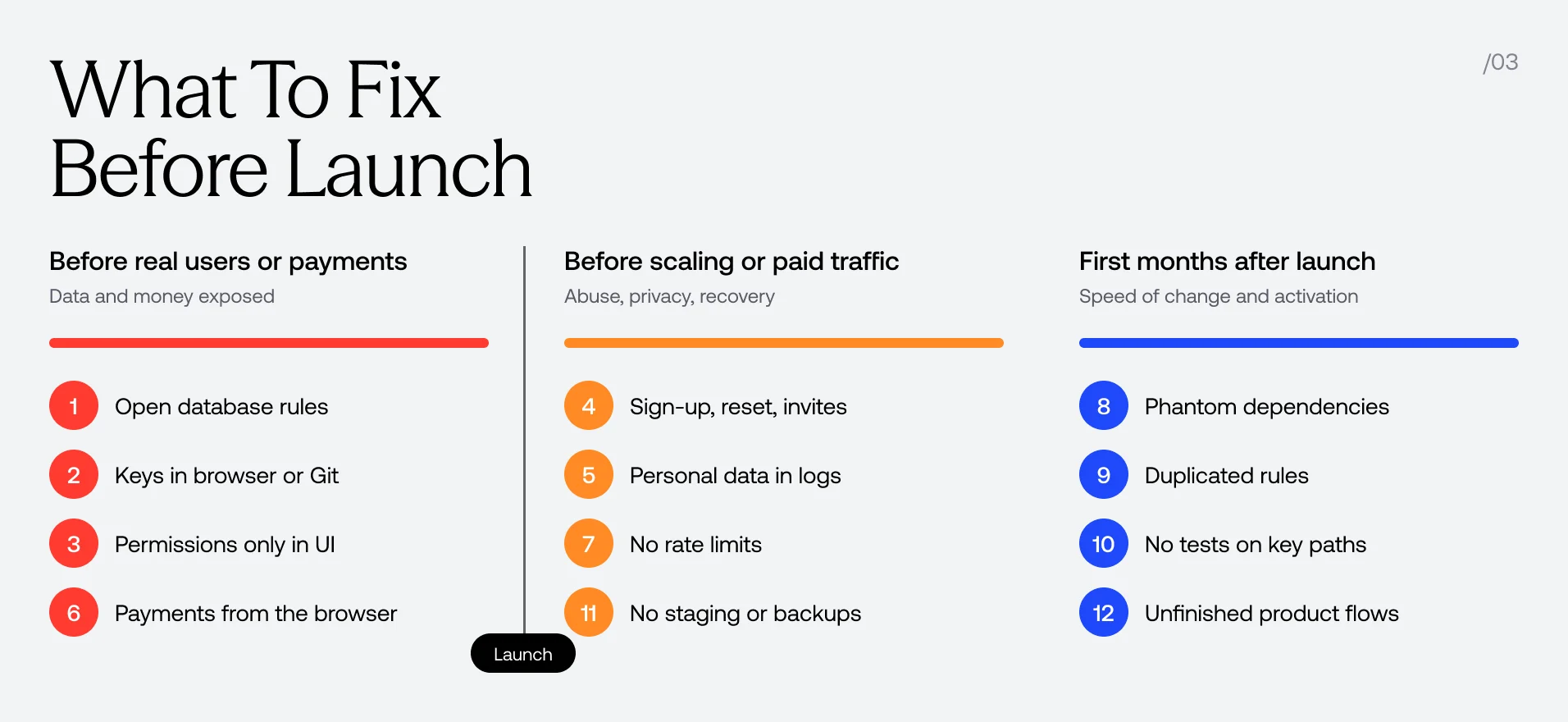
Fix issues 1, 2, 3 and 6 before any real user or payment touches the app: they expose data or money. Fix 4, 7 and 11 before you scale traffic or run ads. Issues 8, 9, 10 and 12 decide how fast you can grow after launch — schedule them, but do not let them block a careful first release.
Priority
Before any real user or payment — Issues: 1, 2, 3, 6; Why: Direct exposure of data or money
Before scaling or paid traffic — Issues: 4, 5, 7, 11; Why: Abuse, data protection, recovery
In the first months after launch — Issues: 8, 9, 10, 12; Why: Speed of change and activation
Will the built-in security scan catch these?
Partly. Since June 2026, Lovable runs a basic security scan before every publish for all users: project configuration, database schema, RLS and sensitive data exposed to the internet. A deeper, AI-powered review of the code is a separate scan. Run both — they remove the obvious problems in issues 1 and 2. But Lovable’s own documentation says these scans do not replace a thorough security review for apps with sensitive data, and none of the scanners test payments, recovery or product flows (issues 6, 9, 10, 11, 12).
What to do next
If you recognised three or more of these issues, do the 10-minute checks above this week. If you store personal data, take payments or are about to raise, get an independent review before launch. Fourmeta’s vibe-coded app audit covers all 12 areas for a fixed £490, with the report in two working days, and ends with a clear decision: launch, fix, refactor or rebuild. To budget for the fix, read how much it costs to fix an AI-built app.
Bottom line
Vibe-coded apps fail in predictable places: data access, keys, payments, limits, tests and recovery. Check those before your users do, and most of the fixes stay small.
alex-rodukov
audit
Frequently asked questions
What are the most common problems in vibe-coded apps?
The most common are database rules that let anyone read or write data, secret keys exposed in the browser, permissions checked only in the interface, unverified payments, missing rate limits, no tests on critical flows, and a single environment with no tested backup. Most come from building for the demo rather than for real users, data and failure.
Are apps built with Lovable or Bolt secure?
They can be, once they are reviewed like any other production app. The tools have improved their built-in scans, but public research still finds open database rules and exposed keys: a 2026 scan of 1,072 Supabase-backed apps found 16% where anyone could change or delete data. Security depends on your configuration and checks, not on the tool that generated the code.
How can I check my vibe-coded app without a developer?
Log in as a second test user and try to open the first user’s records; search your live app’s scripts for secret key prefixes; sign up as a new user on your phone; ask what stops one user calling your AI endpoint 10,000 times. These checks take under an hour and catch the most dangerous issues.
Do vibe-coded apps need to be rebuilt before launch?
Usually not. Most issues — access rules, exposed keys, missing server checks, absent tests — can be fixed in the existing code. A partial rebuild makes sense when the data model cannot support the next stage or business rules are duplicated so widely that every change breaks something. Decide from an audit, not from how the app was built.
What is the biggest risk in a vibe-coded app?
For most apps, it is data access: a database or API that lets one user read or change another user’s data, or lets anonymous visitors in. It is invisible in a demo and serious once real users arrive. OWASP ranks broken access control as the top web application risk.
Alex Rodukov is the CEO and founder of Fourmeta, a London-based AI-native product agency. He works directly with founders on AI products, MVPs and security audits of AI-built apps, from the first scope to launch and beyond.
Subscribe for insights, service updates, and a closer look at the world of Fourmeta®
Discover firsthand experiences from our clients about their journey with Fourmeta®Agency—insights into our collaboration, expertise, and results delivered.
Thank you for subscribe!
Oops! Something went wrong while submitting the form.