


.avif)


Recognitions
projects
Services













Vibe Coding Security Checklist: 25 Checks Before You Launch

Vibe coding is safe enough for launch only when the generated product has been reviewed like any other production application. Before real users, payments or sensitive data enter the system, verify the codebase, secrets, dependencies, authentication, authorization, database policies, inputs, integrations, tests, monitoring and recovery plan. The tool that produced the first version—Lovable, Bolt, Replit, Cursor or something else—is not the security boundary. Your architecture, configuration and review process are. This 25-point vibe coding security checklist helps founders decide whether an AI-built app is ready to launch, needs remediation or should remain a prototype.
The short answer: do not launch if you cannot prove who can access each piece of data, where every secret is stored, how critical actions are tested, what alerts you will receive and how you will recover from a failed deployment or compromised account.
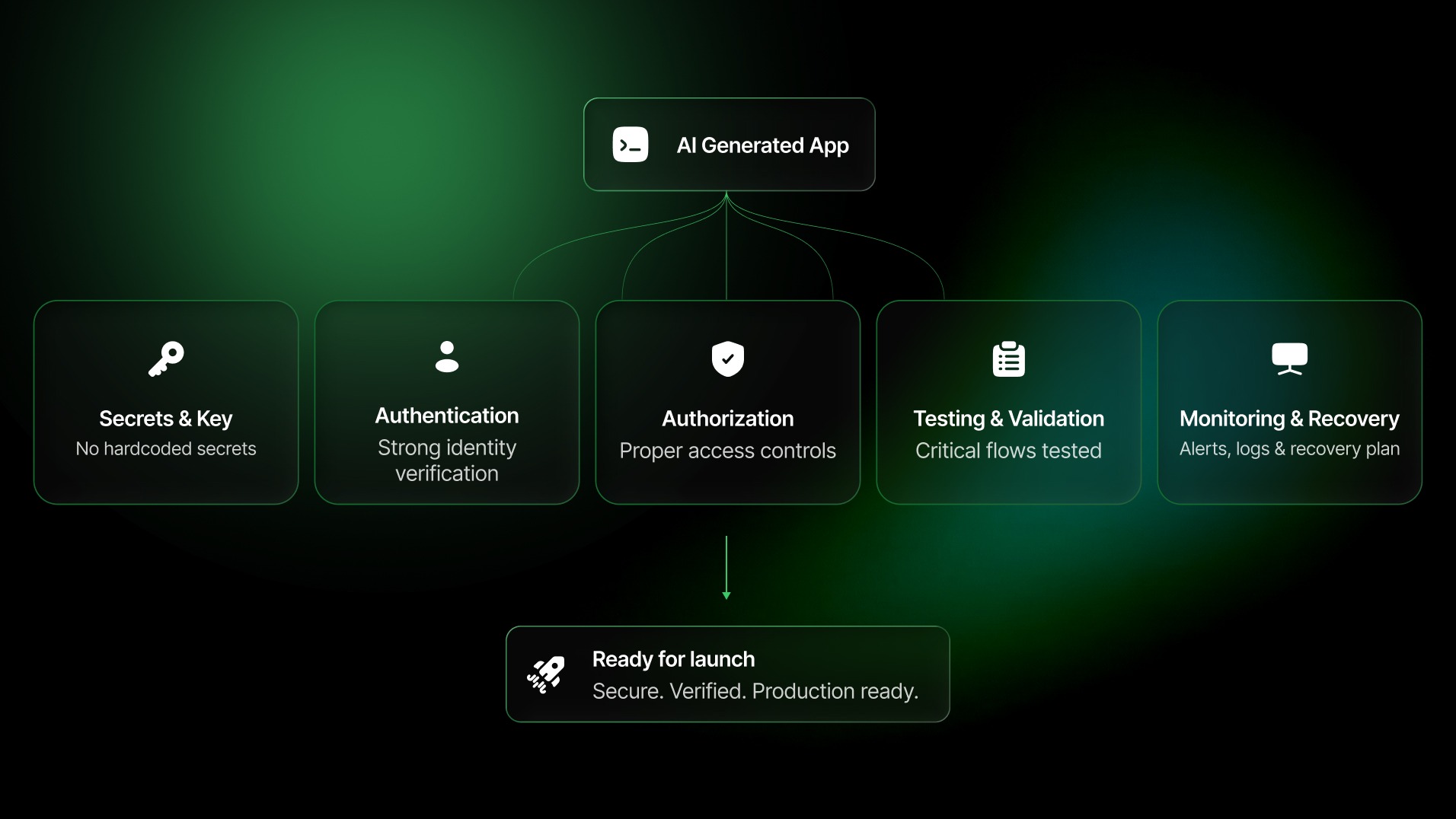
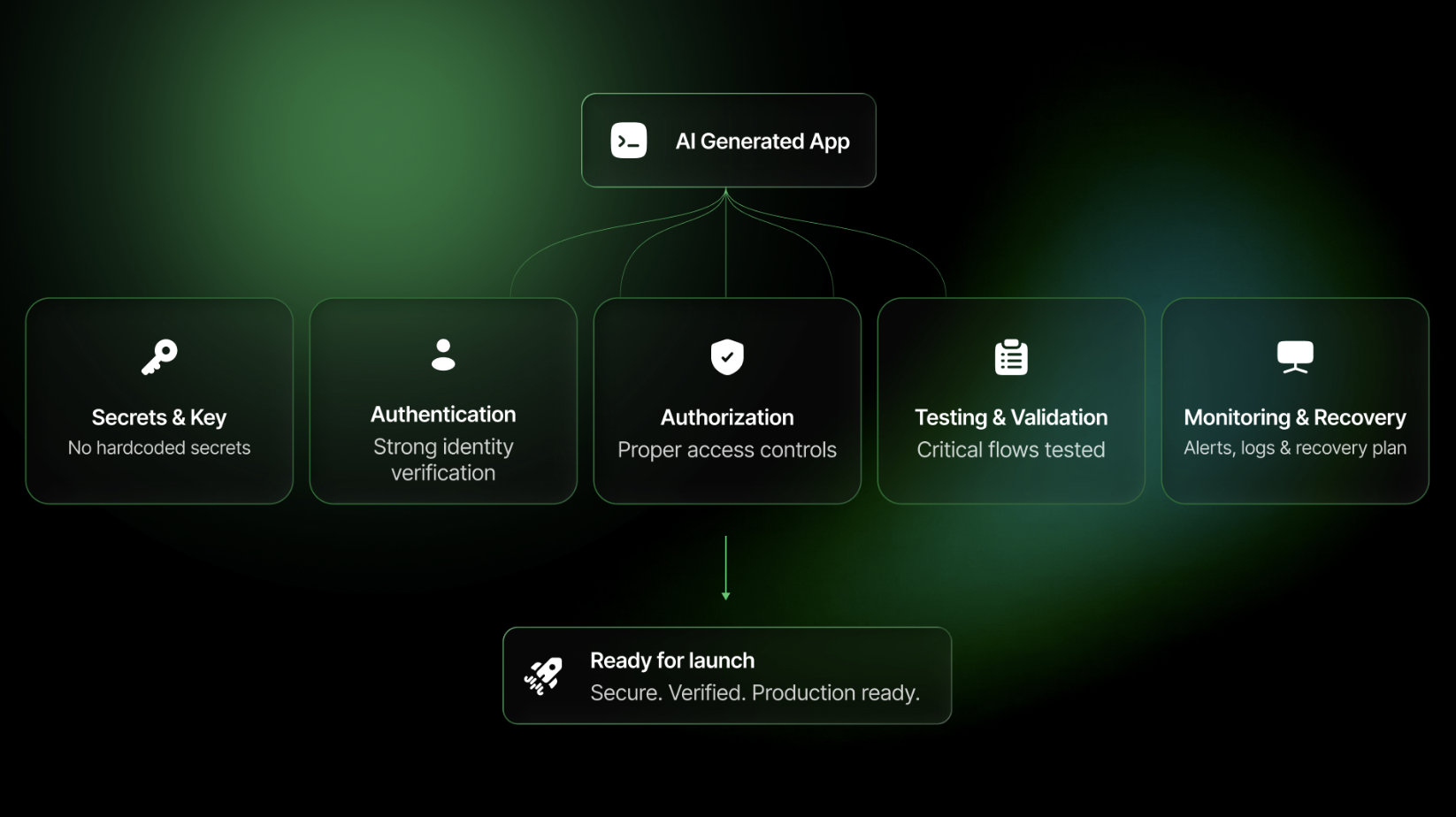
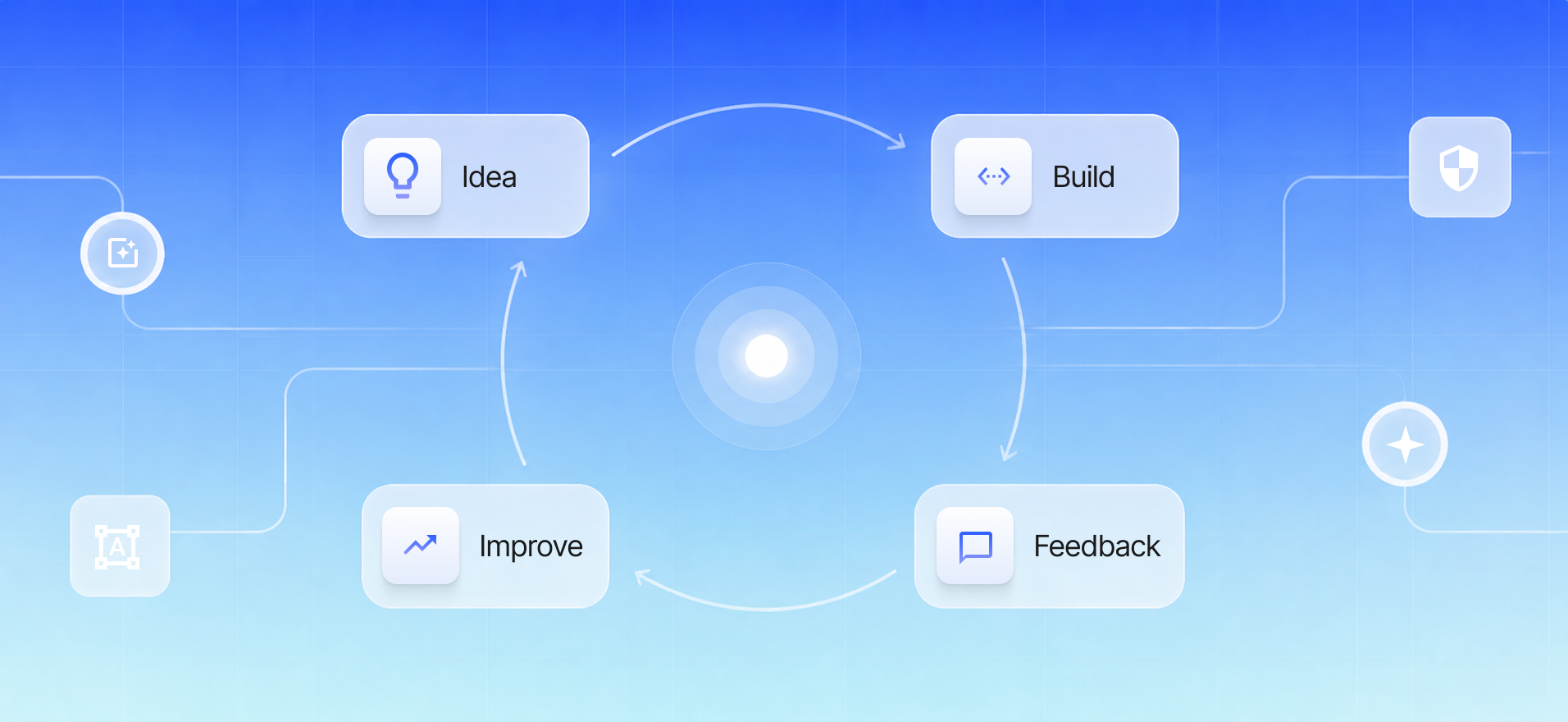
Five security gates protecting a vibe-coded app before launch
Why vibe coding security needs a launch checklist
Vibe coding changes how quickly software appears. It does not change what production software must survive.
A generated app can look convincing while still containing an exposed service key, a database table without access policies, an API route that trusts an identifier from the browser or a payment flow that accepts an unverified webhook. These problems are easy to miss in a demo because the happy path still works.
That is why the useful question is not, “Did the AI write good code?” It is:
Can the team show evidence that the product protects users and behaves safely when requests, accounts, services and assumptions fail?
The latest OWASP Top 10 puts broken access control, security misconfiguration and software supply chain failures in its first three positions. Those categories map directly to the areas that fast AI-assisted builds often leave implicit: who can do what, which defaults are still active and which packages or build steps the application trusts.
Vibe coding itself is not the vulnerability. Shipping unreviewed decisions is.
If you are still deciding which tool fits your stage, start with Fourmeta's comparison of Lovable vs Bolt vs Replit vs Cursor. If you already have a working product, use the checklist below as a launch gate.
How to use this checklist
Score every check as one of three states:
- Pass: there is evidence that the control exists and has been tested.
- Needs work: the control exists, but the evidence or coverage is incomplete.
- Block launch: the control is missing, unowned or has failed a realistic test.
Do not mark an item “pass” because a tool claims to handle it automatically. Verify the production configuration, inspect the code and test the result using accounts with different roles.
This checklist is a triage and launch-readiness tool. It is not a substitute for a threat model, penetration test or compliance review when the product handles high-risk data or regulated workflows.
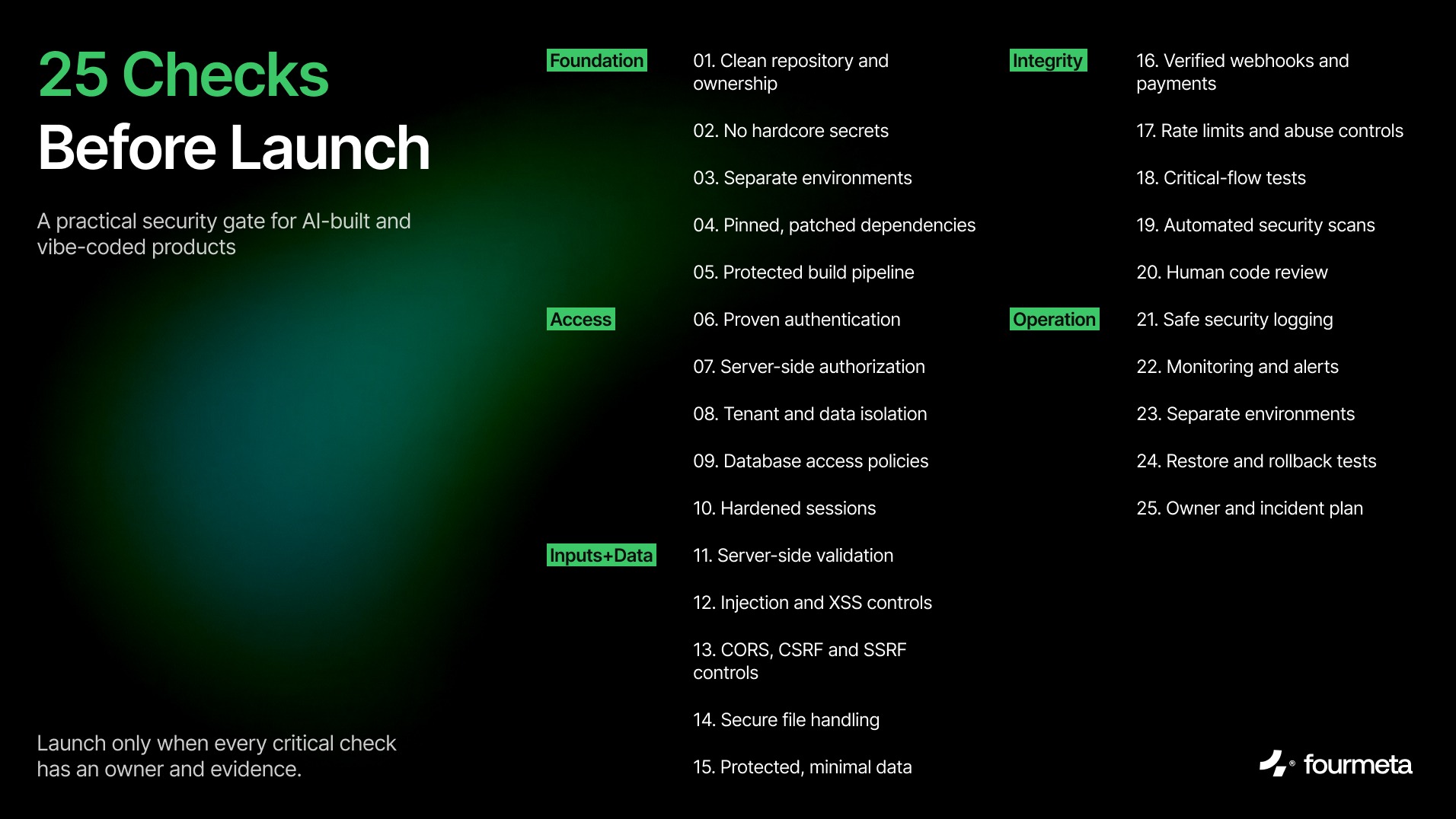
Vibe coding security checklist with 25 launch checks
Foundations: know what you are shipping
1. Confirm code ownership and a clean repository
The company—not an individual freelancer, temporary workspace or tool account—should control the production repository. Confirm that the full source, configuration templates, database migrations and deployment instructions are present.
Review the repository history for generated files, copied code, abandoned experiments and licenses you cannot explain. Protect the main branch, require review for production changes and document how a new engineer can run the product locally.
Block launch if: nobody can recreate the application from the repository or the production code lives only inside a builder account.
2. Remove hard-coded secrets and rotate exposed credentials
Search the current code and its history for API keys, database passwords, service-role keys, private tokens, certificates and credentials pasted into prompts or configuration files.
Moving a secret into .env does not repair a leak if the original value remains in Git history, a screenshot, a build log or a client bundle. Revoke and rotate any credential that may have been exposed, then store replacements in the deployment platform's secrets manager with the narrowest possible permissions.
OWASP's Secrets Management Cheat Sheet recommends managing the full secret lifecycle: storage, access, rotation, auditing and revocation. GitHub push protection can also block recognised secrets before they enter a repository.
Block launch if: a production secret is present in source control or delivered to the browser.
3. Separate development, staging and production
Each environment needs separate credentials, databases, storage buckets, third-party keys and callback URLs. Test data should not share a system with customer data.
Turn off debug modes and development bypasses in production. Verify that a staging deployment cannot read or mutate production data and that a developer cannot accidentally deploy local configuration to the live environment.
Block launch if: development and production share privileged credentials or the same customer dataset.
4. Patch, pin and understand dependencies
AI-generated code can introduce packages simply because they make the requested feature easy to produce. That does not mean every package is necessary, maintained or safe.
Use a lockfile. Remove unused dependencies. Review newly added packages, their maintainers and their install scripts. Run software composition analysis, address known critical vulnerabilities and establish a recurring update process.
OWASP's guidance on software supply chain failures recommends trusted sources, dependency analysis and protection for repositories, build systems and artifacts.
Block launch if: the build pulls unpinned dependencies or a critical known vulnerability is reachable in production.
5. Protect the build and deployment pipeline
Enable multifactor authentication on repository, hosting, database and domain accounts. Limit who can deploy to production. Scope deployment tokens to the environment and action they need.
Production should be built from reviewed code through a repeatable pipeline—not from an engineer's laptop. Keep build logs, restrict administrative access and make rollback possible without rebuilding an unknown version.
Block launch if: a shared password or unrestricted token can change production.
Access: prove who can see and change what
6. Use a proven authentication system
Do not invent password storage, session management or token validation. Use a maintained identity provider or a mature authentication library configured according to its current documentation.
Require MFA for administrators. Test signup, login, logout, email verification, password reset, account recovery and account deletion. Confirm that verification and reset links expire and cannot be reused.
Block launch if: passwords are stored or processed through custom unreviewed logic.
7. Enforce authorization on the server
Authentication answers “Who is this?” Authorization answers “May this user perform this action on this resource?” They are separate controls.
Do not rely on a hidden button, disabled field or client-side route guard. Every API route and server action must check the user's permissions. Apply deny-by-default rules and grant only the capabilities a role needs.
Broken access control remains the highest-ranked risk in OWASP Top 10:2025.
Test it: log in as a normal user and call administrative endpoints directly. Change resource IDs in URLs and request bodies. Try read, update and delete operations.
8. Test tenant and account isolation
Create two ordinary accounts in different organisations or workspaces. Confirm that Account A cannot read, update, delete, export or infer Account B's records—even when it knows a valid record ID.
Repeat the test for files, search results, exports, analytics, notifications, background jobs and AI-generated summaries. Multi-tenant leaks often appear outside the main dashboard.
Block launch if: changing an identifier exposes another user's data.
9. Lock down database access policies
If the browser can call the database API directly, database policies become a core security boundary.
For Supabase projects, enable Row Level Security on every exposed table and view, then create explicit policies for select, insert, update and delete. Supabase states that RLS should always be enabled on tables in an exposed schema such as public. Test policies with anonymous, authenticated and service-role contexts—not only through the normal UI. See the official Supabase RLS guidance.
Keep service-role credentials on the server. Review database functions that bypass ordinary policies and remove default grants that are not required.
Block launch if: an anonymous or ordinary authenticated client can query an exposed table without the intended policy.
10. Harden sessions, tokens and account recovery
Set cookies with Secure, HttpOnly and an appropriate SameSite policy. Use short-lived access tokens, controlled refresh-token rotation and server-side revocation where the risk requires it.
Do not store high-value bearer tokens in browser-accessible storage when a secure cookie or platform-specific secure storage is appropriate. Invalidate sessions after password changes, account suspension and privilege changes. Protect account recovery from user enumeration and replay.
Block launch if: a copied token remains valid indefinitely or an administrator cannot revoke a compromised session.
Inputs and data: treat every boundary as untrusted
11. Validate every input on the server
Define expected types, lengths, formats and allowed values for request bodies, URL parameters, query strings, headers, uploaded metadata and webhook payloads.
Client-side validation improves usability, but attackers can bypass it. The server must reject unexpected fields, oversized values and malformed structures. Use allowlists for finite choices and shared schemas where they reduce drift between client and server.
Test it: send missing, extra, very long, negative, duplicated and incorrectly typed values to every critical endpoint.
12. Prevent injection and unsafe output
Use parameterised database queries and safe framework APIs. Avoid building SQL, shell commands, file paths or HTML by concatenating untrusted input.
Encode output for its destination, sanitize user-authored rich text and review any use of eval, dynamic code execution, raw HTML rendering or command-line processes. AI features need the same boundary discipline: model output is untrusted data, not executable instructions.
Block launch if: user input can alter a query, command or executable template structure.
13. Restrict CORS, CSRF and server-side requests
Use an explicit CORS allowlist instead of reflecting arbitrary origins. Protect state-changing browser requests from CSRF using framework-supported tokens and/or a correctly designed SameSite cookie strategy.
If the server fetches user-supplied URLs—for previews, imports, webhooks or AI tools—prevent access to internal networks, cloud metadata endpoints and non-approved protocols. Validate redirects and resolve DNS safely.
Block launch if: an arbitrary website can make authenticated state-changing requests or the server will fetch any URL supplied by a user.
14. Secure file uploads and storage
Allow only the file types the product needs. Check size, extension and actual content; do not trust the browser's Content-Type header. Generate storage filenames, scan risky content and keep private files outside public buckets.
Authorise both upload and download. Use short-lived signed URLs when appropriate. OWASP's File Upload Cheat Sheet recommends allowlisting extensions, validating file types, renaming files and enforcing size limits.
Block launch if: executable content can be uploaded to a public location or private files are addressable without authorization.
15. Minimise and protect sensitive data
Write down every category of personal, financial, confidential or regulated data the application collects. For each category, define why it is needed, where it is stored, who can access it, how long it is retained and how it is deleted.
Use encryption in transit and platform-appropriate encryption at rest. Never send server secrets or unnecessary personal data to the client. Mask production data before using it in development, analytics or AI prompts.
Block launch if: the team cannot locate, export and delete a user's data or does not know which third parties receive it.
Built with an AI coding tool? Fourmeta's AI-Built Product Audit turns these checks into a documented go/no-go, remediation, refactor or rebuild decision.
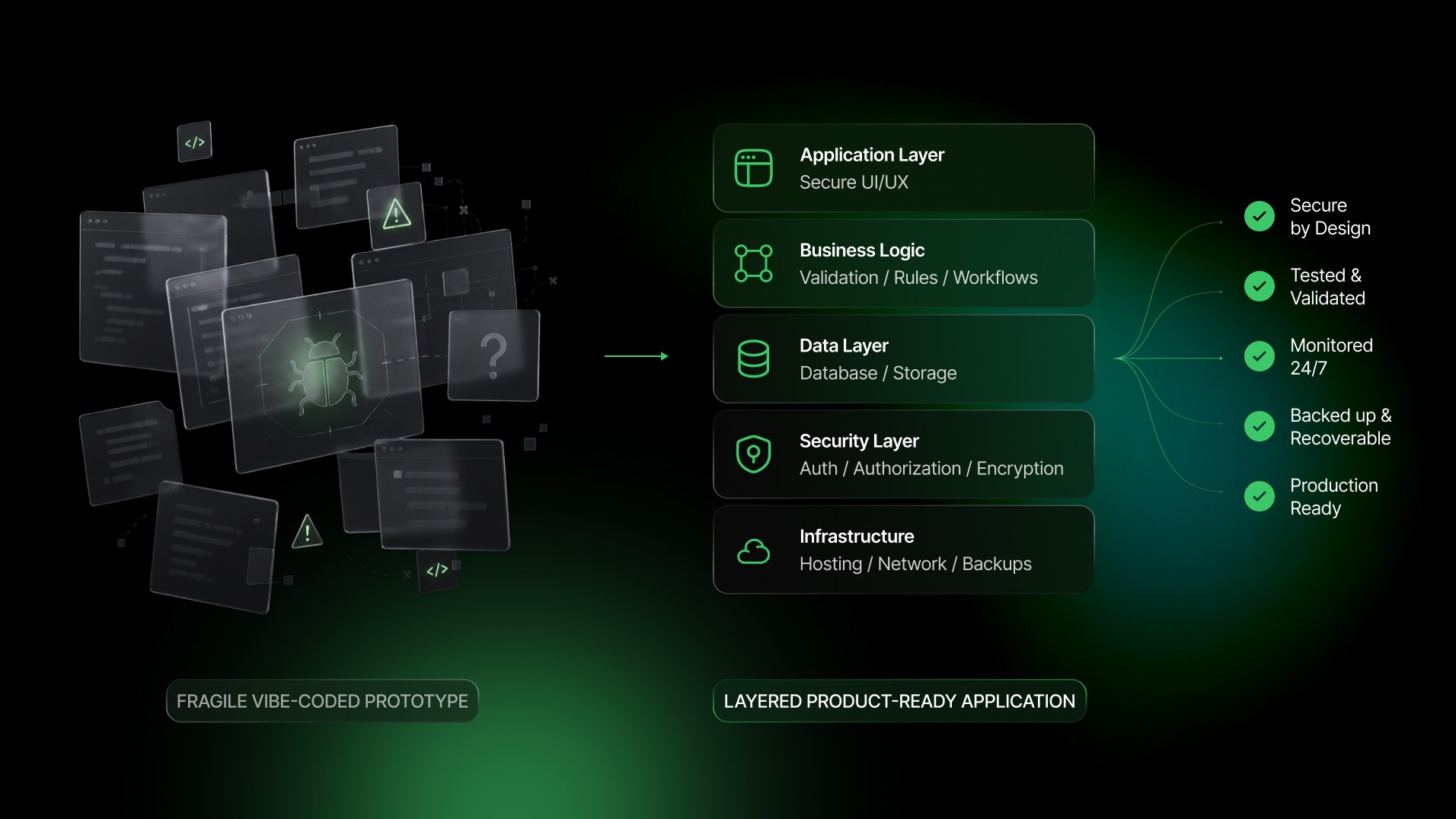
A fragile vibe-coded prototype becoming a layered production-ready application
Integrity: verify critical behaviour, not just screens
16. Verify webhooks, payments and financial events
Validate webhook signatures using the provider's official library and the unmodified request body. Reject stale or replayed events. Make handlers idempotent so a retry cannot create a second charge, credit or order.
Calculate prices, discounts and permissions on the server. Do not trust amounts, product IDs or subscription states sent by the browser. Reconcile important payment states with the provider.
Block launch if: a client request can mark an order as paid or an unsigned webhook can change account state.
17. Add rate limits and abuse controls
Rate-limit login, password reset, verification, signup, invitation, search, export, upload, messaging and AI-generation endpoints. Apply limits by the combination of account, IP, device, organisation and action that fits the threat.
Set budgets for endpoints that trigger paid APIs or expensive model calls. Add bot and spam controls where automation could create financial or operational damage. Return safe retry guidance without revealing sensitive account state.
Block launch if: an unauthenticated script can create unbounded cost, messages, accounts or requests.
18. Test critical user journeys and their failure modes
Identify the journeys that would harm a user or the business if they failed: login, permission changes, checkout, billing, data export, deletion, invitation, recovery and administrative actions.
Automate the happy path and the important negative paths. Include authorization tests, invalid input, duplicate events, third-party timeouts and expired sessions. Run the suite before production deployments.
A codebase with no meaningful tests is not automatically insecure, but it makes safe change harder to demonstrate.
Block launch if: nobody can verify that a security-critical change did not break an existing control.
19. Run automated security scans
Use multiple layers: secret scanning, static application security testing, dependency analysis and, where relevant, container and infrastructure-as-code scanning. Fail the build for confirmed critical issues and document how lower-severity findings are triaged.
Scanners are filters, not verdicts. They can miss architecture and business-logic vulnerabilities, and they can produce false positives. Combine them with tests and human review.
NIST's Secure Software Development Framework recommends integrating secure practices, review and appropriate testing into the development lifecycle rather than treating security as a final check.
20. Require human review of AI-generated code
A technically qualified reviewer should understand every security-critical path before launch. Review authentication, authorization, database queries, file handling, payments, secrets, privileged functions and third-party integrations.
Look for hallucinated packages, invented APIs, duplicated logic, unreachable code, unsafe defaults and comments that promise a control the implementation does not provide. Record important architecture and risk decisions so the next person does not have to infer them from generated code.
Block launch if: no one on the team can explain how a critical action is authorised and persisted.
Operations: be ready for the launch to go wrong
21. Log security events without logging secrets
Record authentication failures, authorization failures, administrative changes, role changes, sensitive exports, webhook verification failures and important configuration changes.
Do not log passwords, session tokens, API keys, payment data, full request bodies or unnecessary personal information. Protect log access and retention. OWASP's Logging Cheat Sheet distinguishes useful security logging from indiscriminate data collection.
Block launch if: an incident would leave no reliable timeline—or the logs themselves expose credentials.
22. Add monitoring and actionable alerts
Logs are evidence. Alerts create action.
Monitor availability, latency, error rates, unusual authentication activity, privilege changes, traffic spikes, payment failures and costly API usage. Route alerts to a named person, define severity levels and test the notification path.
Avoid alert noise. If every minor error pages the team, the real incident will be ignored.
Block launch if: the only way to discover a failure is through a customer complaint.
23. Make errors fail closed
Unexpected conditions should deny access or stop the sensitive action—not bypass checks. Return generic client-safe errors while preserving useful diagnostic context in protected logs.
Remove production stack traces and debug endpoints. Test third-party outages, database timeouts, malformed responses, partial writes and duplicate jobs. Ensure retries cannot repeat a harmful side effect.
OWASP added mishandling of exceptional conditions to its 2025 Top 10, reflecting how dangerous abnormal states and failing-open logic can be.
24. Test backups, restore and rollback
Confirm exactly what is backed up: databases, uploaded objects, configuration, infrastructure and critical third-party data. A database backup may not include files stored elsewhere.
Perform a restore test. Define acceptable recovery time and data loss. Make database migrations reversible or provide a tested forward-repair plan. Keep a known-good application version ready for rollback.
Block launch if: a backup exists on a dashboard but nobody has restored it successfully.
25. Assign a security owner and incident plan
Name the person responsible for production security decisions. Document how to revoke credentials, disable a feature, suspend compromised accounts, contact vendors, preserve evidence and communicate with affected users.
Keep ownership details for the repository, cloud accounts, domain, database, email, payments and analytics. Document handover before an agency, freelancer or founding engineer leaves.
Block launch if: there is no person with the access and authority to respond to an incident.
The seven conditions that should stop a launch
The product should remain in staging if any of these are true:
- A production key or service-role credential has been exposed.
- One user can access another user's or tenant's data.
- Development and production share privileged credentials or customer data.
- Payments or critical webhooks are accepted without server-side verification.
- Private files or database tables are publicly accessible.
- Nobody can restore the product or roll back a failed deployment.
- Nobody technically qualified owns the production code and incident response.
Fixing launch blockers is usually cheaper than containing an incident after customers arrive.
What an AI-built product audit should deliver
A useful audit should not end with a long scanner export. It should give the product owner a decision.
For each finding, record:
- the affected user journey, component and environment;
- the risk and realistic impact;
- evidence that another person can reproduce;
- the recommended fix and accountable owner;
- whether the issue blocks launch;
- whether the code should be repaired, refactored or rebuilt;
- the retest result after remediation.
For products moving from prototype to commercial use, combine code security with architecture, QA, accessibility, performance and maintainability. Fourmeta's AI MVP development guidance explains why a working prototype and a production-ready MVP are different stages.
Frequently asked questions
Is vibe coding secure?
Vibe coding can be part of a secure development process, but generated code is not secure by default. Security depends on the architecture, configuration, dependencies, access controls, testing, review and operations surrounding the code.
Can Lovable, Bolt, Replit or Cursor build a secure app?
They can help produce parts of a secure app. None of them removes the product owner's responsibility to verify authentication, authorization, data policies, secrets, dependencies, integrations, tests and production operations. The more sensitive or complex the product, the more expert review it needs.
What is an AI code audit?
An AI code audit is a structured review of software created or materially assisted by AI. It examines security, architecture, code quality, dependencies, test coverage and operational readiness, then translates findings into a launch, remediate, refactor or rebuild decision.
When should a vibe-coded app receive a security review?
Review it before connecting production data, accepting payments, inviting external users, integrating privileged third-party systems or presenting the product as production-ready. Review it again after major architecture, authentication or data-model changes.
Is a security scanner enough?
No. Automated scanning is useful for known patterns, exposed secrets and vulnerable dependencies. It is weaker at finding business-logic flaws, incorrect permissions, tenant leaks and unsafe product assumptions. Use scanners alongside human review and realistic tests.
A working demo is the beginning of the security conversation
Vibe coding gives founders a faster route to something testable. That is valuable. The risk begins when speed is mistaken for evidence.
Before launch, make every critical control visible, testable and owned. If the team cannot explain how data is protected, how privileged actions are authorised or how the product will recover, the product is not ready yet.
Built something with Lovable, Bolt, Replit, Cursor or another AI coding tool? Fourmeta can review the product, prioritise launch blockers and help turn the prototype into software a team can safely operate.
Book an AI-Built Product Audit





.avif)


